Knowledge Base
Last Updated: 2026-07-30
BMW DoIP Routing Activation Request Troubleshooting
BMW ENET and similar DoIP workflows can fail either during routing activation itself or immediately after activation when the session never becomes operationally stable.
Evidence Summary
Interpret the retained observation before assigning a diagnostic conclusion.
Observed
Post-activation session instability observed in the retained evidence window
Supported interpretation
Only the retained, approved observation is supported.
Not established
Not determined from Routing Activation response code 0x10 alone; the later FIN, reset, or liveness observations require additional transport, gateway, and bus evidence for root-cause attribution.
Recommended next check
Inspect the first UDS exchange after payload type 0x0006 (code 0x10) and the first transport-level teardown event before changing activation assumptions.
Visual Evidence
These panels are reviewed, public-safe, role-based event summaries. They are not raw packet captures or screenshots.
Wireshark Handshake Snapshot
Generated from the redacted sample for EVID-PORT13400-VCI-DISCONNECT-01.
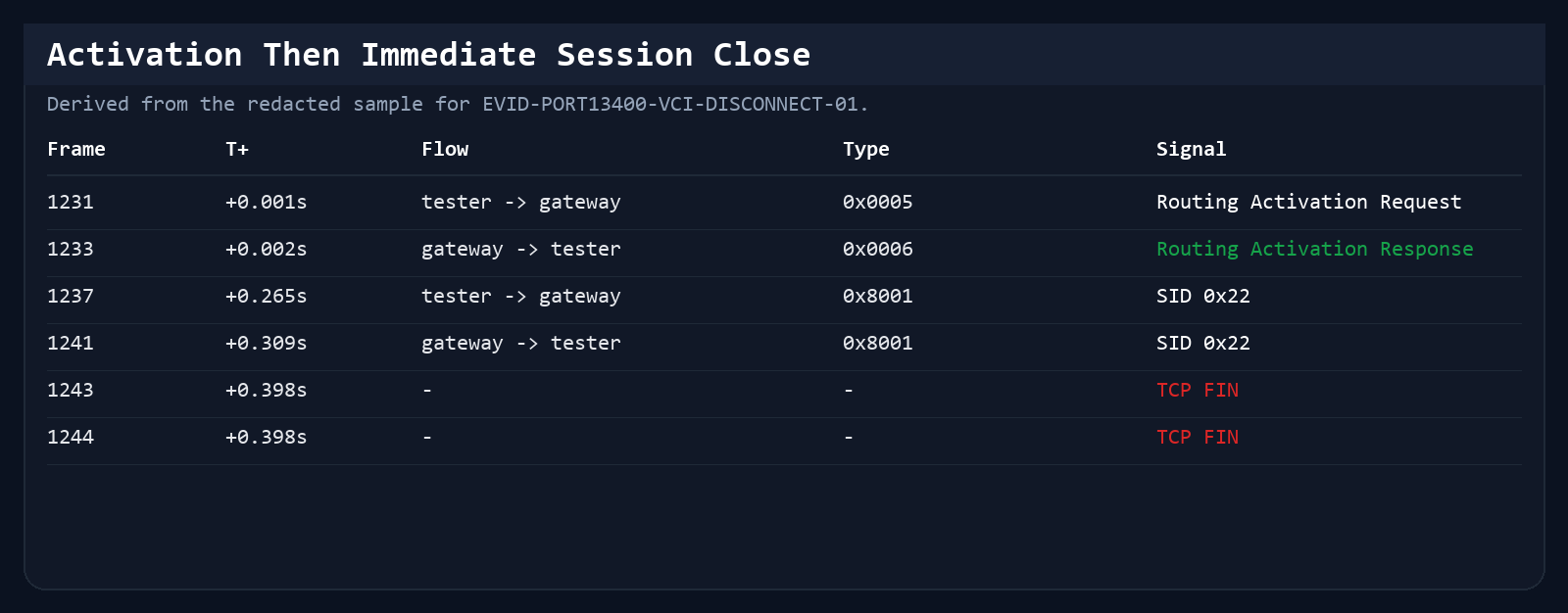
Evidence reference: EVID-PORT13400-VCI-DISCONNECT-01
Derived from: original frame window 1230-1245
Normalized by: DiagAgent
Original packet count: compact activation window extracted from a larger field capture
Wireshark Alive-Check Break Snapshot
Generated from the redacted sample for EVID-ROUTING-ALIVECHECK-BREAK-01.
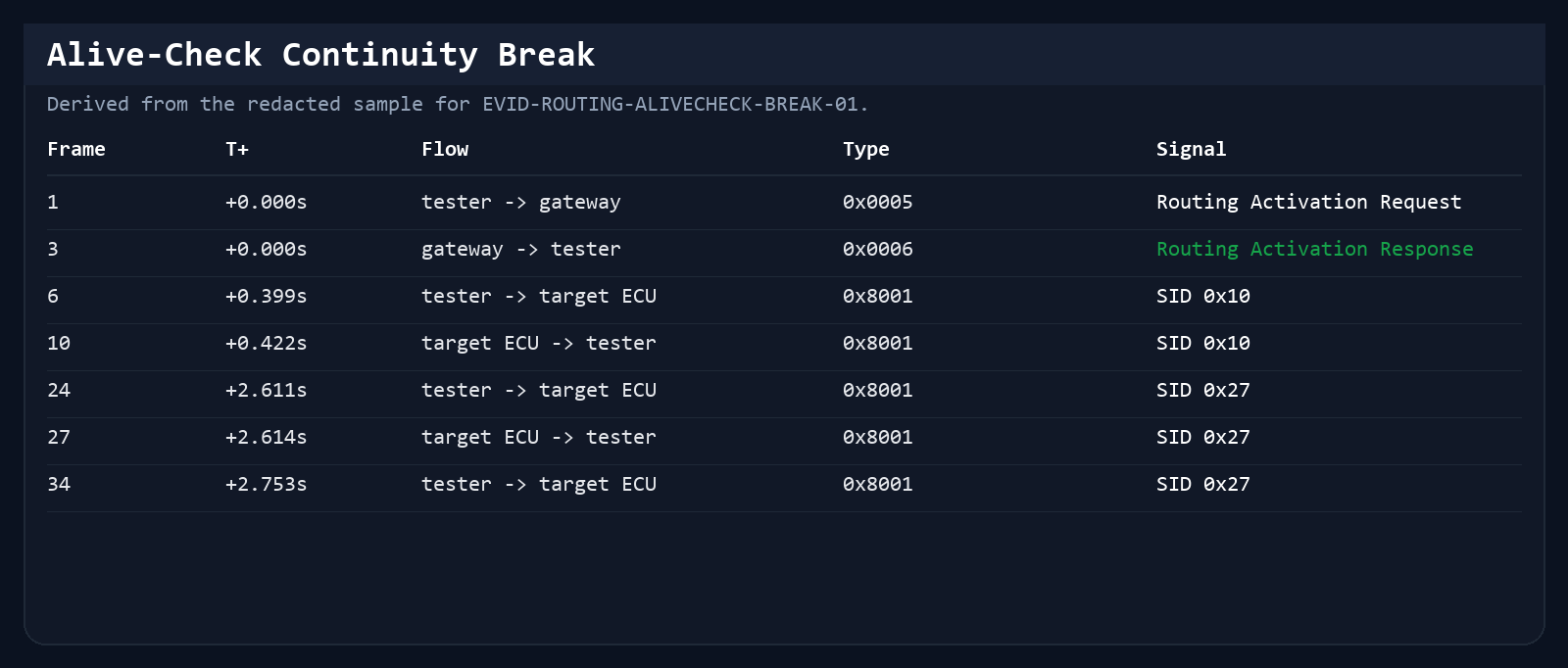
Evidence reference: EVID-ROUTING-ALIVECHECK-BREAK-01
Derived from: original frame window 287-734
Normalized by: DiagAgent
Original packet count: sample window extracted from a longer routed-session capture
Analyzer Verdict Screenshot
Generated from the redacted routing-activation teaching windows.
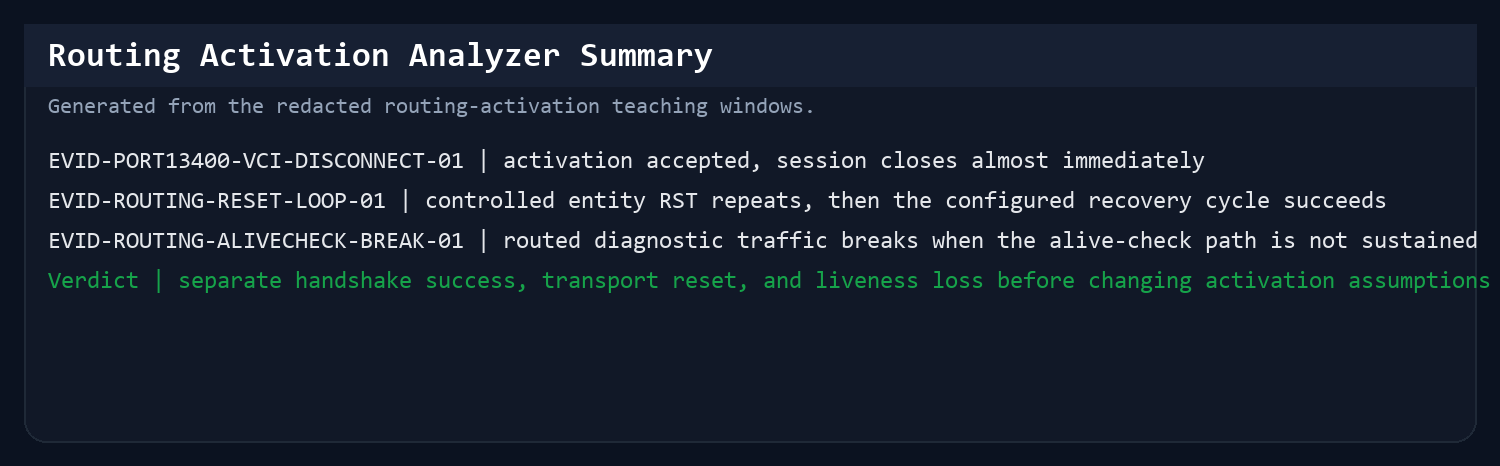
Evidence reference: EVID-PORT13400-VCI-DISCONNECT-01 + EVID-ROUTING-ALIVECHECK-BREAK-01
Derived from: EVID-PORT13400-VCI-DISCONNECT-01 + EVID-ROUTING-ALIVECHECK-BREAK-01
Normalized by: DiagAgent
Original packet count: activation close window + longer routed-session capture
Timeline
Read this as a role-based swimlane: it shows observed request/response order, not an unproven causal chain.
Observed: Post-activation session instability observed in the retained evidence window
Not established: Not determined from Routing Activation response code 0x10 alone; the later FIN, reset, or liveness observations require additional transport, gateway, and bus evidence for root-cause attribution.
Next check: Inspect the first UDS exchange after payload type 0x0006 (code 0x10) and the first transport-level teardown event before changing activation assumptions.
Tester
Gateway / ECU
Evidence boundary
Routing activation request
Routing activation response payload 0x0006 (code 0x10)
Short-lived session traffic or pending state
FIN / RST / liveness break
Priority FAQ
What is a routing activation request in DoIP?
It is the step that asks the gateway to allow the tester into the diagnostic session before normal UDS traffic proceeds.
When This Article Applies
Best when ENET connectivity looks alive but the diagnostic session never actually opens.
Capture-Backed Evidence
Each example identifies whether it is a controlled simulator observation or a redacted field-evidence window. The evidence record bounds what the sequence can and cannot establish.
Repeated activation success followed by repeated disconnects
Repeated routing activation followed by repeated disconnects
Evidence reference: EVID-ROUTING-RESET-LOOP-01
Node roles in this case
- tester: the external diagnostic client
- gateway: the DoIP entry point that accepts activation
- diagnostic node: the downstream node involved in the session
A field capture where response code 0x10 repeatedly establishes control-layer activation, but the session still collapses under connection churn.
Evidence signals
- 17 Routing Activation Requests (0x0005) and 17 Routing Activation Response frames (payload type 0x0006, response code 0x10) were observed, establishing control-layer activation without proving downstream stability.
- 324 UDS payloads were carried, which proves the session moved beyond the initial handshake.
- The file then devolves into 7,737 TCP RST packets, which points to link or session stability rather than a simple missing activation response.
Timeline
- Around +19.061 s: SID 0x29 / NRC 0x78 appears after an activated session is already running.
- Around +21.809 s: SID 0x38 / NRC 0x78 appears on the same overall workflow.
- At multiple later cycles the session reopens, carries UDS traffic, and then resets again instead of staying stable.
This is useful for the routing-activation article because it shows a subtle but important distinction: response code 0x10 establishes the control-layer boundary while the overall gateway-to-tester session still fails operationally.
Single activation pair followed by immediate session close
Single routing activation followed by immediate session close
Evidence reference: EVID-PORT13400-VCI-DISCONNECT-01
Node roles in this case
- tester: the external diagnostic client
- gateway: the vehicle-side DoIP entry point
A simpler capture that shows how little time can pass between control-layer activation response 0x10 and an unusable session.
Evidence signals
- 1 Routing Activation Request (payload type 0x0005) and 1 Routing Activation Response (payload type 0x0006, response code 0x10) were observed.
- Only 2 UDS messages followed before both sides closed the TCP session.
- This is a clean teaching sample for 'response code 0x10 was returned, but the session still died'.
Timeline
- Packet 1231: Routing Activation Request.
- Packet 1233: Routing Activation Response payload type 0x0006 (response code 0x10).
- Packets 1243-1244: bidirectional FIN closes the session almost immediately.
Real Timeline
- Packet 1231 | tester | Routing Activation Request | The tester reaches the gateway on the expected DoIP path.
- Packet 1233 | gateway | Routing Activation Response | Gateway returns Routing Activation Response payload type 0x0006 (response code 0x10), establishing control-layer activation.
- Packets 1243-1244 | both sides | Bidirectional FIN closes the TCP session | The session becomes unusable almost immediately after activation.
Sanitized Message Snippets
- tester -> gateway | DoIP payload 0x0005 | routing activation request
- gateway -> tester | DoIP payload 0x0006 (code 0x10) | control-layer activation boundary established
- tester <-> gateway | TCP FIN/ACK | session closes before useful diagnostics continue
Why the analyzer concluded this
- A Routing Activation Response payload type 0x0006 carrying response code 0x10 establishes the DoIP control-layer activation boundary and disproves the claim that the gateway never responded.
- The rapid FIN sequence after only two UDS messages supports a post-activation collapse diagnosis rather than an activation rejection diagnosis.
It gives the page a shorter, easier-to-read example before the more complex repeated-reset case.
A routed session can fail later when alive-check continuity is lost
Alive-check break during a routed diagnostic session
Evidence reference: EVID-ROUTING-ALIVECHECK-BREAK-01
Node roles in this case
- tester: the diagnostic client
- gateway: the DoIP entry point
- target ECU: the ECU involved in the long-running operation
This case is closer to a real routing-activation failure-adjacent problem than the immediate-FIN sample. The session opens, enters diagnostic work, then loses stability when alive-check continuity is no longer sustained.
Evidence signals
- Routing Activation Response payload type 0x0006 carrying response code 0x10 is received and the session proceeds into session control, security, read, routine, and data-transfer traffic.
- The target ECU later emits pending under SID 0x38 before the broader session loses continuity.
- The window ends in disconnect behavior, which makes it a better bridge between control-layer activation response and practical session-failure analysis.
Timeline
- The tester opens the DoIP path and receives Routing Activation Response payload type 0x0006 (code 0x10).
- The same session proceeds through several normal diagnostic steps before a pending state appears under SID 0x38.
- The session later loses continuity and the connection is torn down, showing that the operational failure sits after activation rather than before it.
Real Timeline
- session start | tester/gateway | Routing Activation Response payload type 0x0006 (response code 0x10) received | The path is initially established at the DoIP control layer.
- mid-session | target ECU | SID 0x38 enters pending | The long-running diagnostic path is still active when instability begins to accumulate.
- late session | broader path | Alive-check continuity breaks and disconnect behavior appears | The practical failure sits after activation, under session-liveness pressure.
Sanitized Message Snippets
- tester -> gateway | DoIP payload 0x0005/0x0006 (code 0x10) | control-layer activation boundary established
- tester -> target ECU | mixed session-control / read / routine traffic | normal work proceeds
- target ECU -> tester | UDS SID 0x38 | result: NRC 0x78 | long-running operation
- gateway path | keep-alive continuity breaks | disconnect behavior follows
Why the analyzer concluded this
- Routing Activation Response code 0x10 plus later diagnostic traffic proves the gateway initially responded at the control layer.
- The disconnect occurs after higher-level work and a pending phase are already underway, which rules out a strict pre-UDS activation failure.
- The failure timing lines up better with liveness continuity loss than with an immediate addressing or activation-type rejection.
This sample lets the routing page explain a subtle but common field problem: the gateway returned response code 0x10, but the usable diagnostic path still collapsed later under keep-alive or session-liveness pressure.
Packet Evidence
These packet-level checkpoints are the smallest proof units behind the article narrative.
Frame 1231
tester -> gateway
DoIP 0x0005 routing activation request.
Shows the tester reached the correct handshake stage.
Frame 1233
gateway -> tester
DoIP payload type 0x0006 routing activation response (code 0x10).
Disproves a pure activation-never-responded interpretation at the control layer.
Frame 1243-1244
tester <-> gateway
TCP FIN closes the session almost immediately.
Shifts the diagnosis from activation failure to post-activation instability.
Analyzer Conclusion
This is the condensed engineering verdict the analyzer would put in front of the operator.
Summary judgment
routing activation response code 0x10 was returned, but the diagnostic path became unstable after control-layer activation rather than during it.
Likely fault direction
investigate TCP closure, reset churn, and alive-check continuity before changing activation-type assumptions.
Top action
inspect the first post-activation UDS exchange and the first transport teardown event in the same session window.
False Positives
These are cases where the tool symptom can point in the wrong direction unless the packet timeline is checked.
Symptom: The workshop tool says the gateway never opened the session.
Packet truth: A valid Routing Activation Response (payload type 0x0006, code 0x10) is present, followed by short-lived UDS traffic.
Risk: Engineers may waste time changing activation settings when the real failure is later TCP/session collapse.
Symptom: The user blames activation type immediately after a disconnect.
Packet truth: The capture already passed activation and moved into session control, routine, and data-transfer traffic before continuity broke.
Risk: Root-cause analysis stops too early and misses alive-check or liveness handling defects.
Decision Tree
Use this order in real troubleshooting so packet evidence narrows the branch before repair effort expands.
- 1. Check whether a Routing Activation Response payload type 0x0006 (carrying response code 0x10) exists. If not, stay in handshake troubleshooting.
- 2. If payload type 0x0006 (code 0x10) exists, inspect the first UDS frames after activation and determine whether the path ever becomes operationally useful.
- 3. If the path closes quickly with FIN or RST, classify it as post-activation instability, not pure activation failure.
- 4. If the session survives into routine, read, or transfer traffic, check alive-check continuity and late disconnect timing before revisiting activation assumptions.
Common Misreads
These are the interpretation traps that real packet evidence helps avoid.
- If payload type 0x0006 carrying response code 0x10 is present, the control-layer routing activation step itself responded even when the overall diagnostic session is not stable.
- Repeated reconnects can look like 'the gateway never opened' in the UI, but packet evidence can show the opposite.
- The right question is not only 'Did routing activation happen?' but also 'What happened on the TCP and UDS layers right after it?'
What the Handshake Does
Routing Activation Request and Response show the observed DoIP control-layer state; response code 0x10 establishes activation only at that layer.
If this phase fails, later UDS troubleshooting is irrelevant because the session never reached a stable diagnostic path.
How to Confirm Whether the Session Ever Became Usable
Inspect the request or response pair, validate the activation type, and check whether the gateway actually returned the expected response payload.
Then look one step beyond activation: confirm whether the first diagnostic requests and keep-alive behavior show a stable usable session or an early collapse.
Typical Failure And Post-Activation Collapse Patterns
Common failure modes include no response from the gateway, a rejected activation type, or a request sent on the wrong source addressing context for the tool chain in use.
A second class of problems looks similar at the UI layer: a response code 0x10 control-layer activation is observed, but the session later dies under reset churn, FIN closure, or liveness pressure before useful diagnostics complete.
Why Packet-Level Validation Matters
A capture lets you separate physical connectivity, IP reachability, routing activation policy failures, and post-activation instability instead of treating them as one generic ENET problem.
That distinction is especially useful when reproducing issues across different laptops, adapters, or workshop networks.
More Frequently Asked Questions
Why does BMW routing activation fail?
Typical causes include missing gateway responses, unsupported activation types, or requests sent in the wrong addressing context for the tool chain.
Related Diagnostic Guides
Use nearby guides to move from protocol filtering to root-cause troubleshooting without leaving the knowledge base.